![CoMetrics_Logo_CMYK-2.png]](https://help.cometrics.com/hs-fs/hubfs/CoMetrics_Logo_CMYK-2.png?height=40&name=CoMetrics_Logo_CMYK-2.png)
What historical data to submit:
If you have questions on what to submit, or if you're unsure you should be uploading this type of file, please message us.
- Submit data for all AHRI-certified parts and equipment, including thermostats and controls. We will filter out what we don't currently report on. Click here for a sample file.
- For your first upload, please go back to January 2021 or as far back as is feasible.
- Upload as an Excel or CSV. Use this Unitary Data File Template as a guide - it does not have to be in this exact format.
How to submit your historical data:
Only use these instructions for submitting historical data during the onboarding process, or when specifically requested to do so. For regular monthly submissions, please use these instructions.
- Log in to the CoMetrics portal here

- Click on My Data
- Click Unitary Data in the My Data Hub

- If you are only authorized to submit for the Unitary program, you will not see this step.
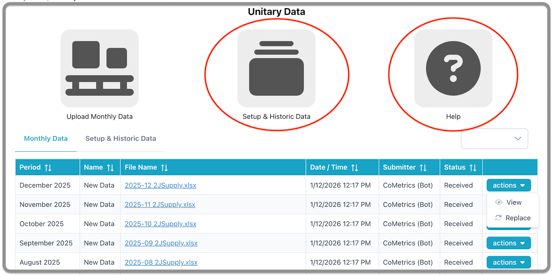
- Select Setup & Historic Data
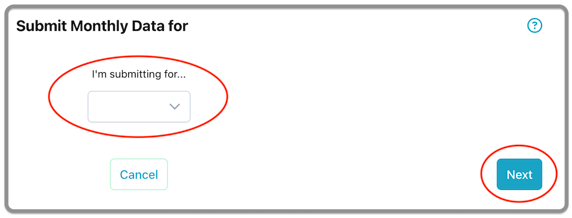
- Select the company for which you are submitting, and click Next.
- If you are only authorized to submit for one company, you will not
see this step
- If you are only authorized to submit for one company, you will not
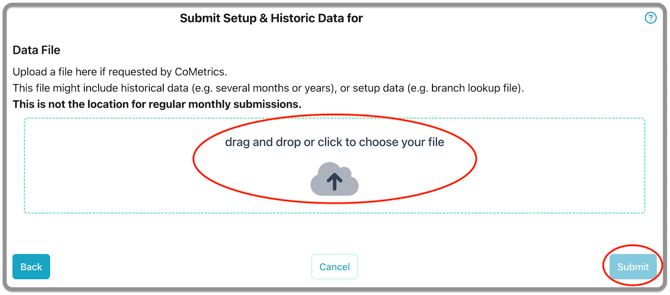
- Drag and drop, or browse to upload your file, then click Submit.
For a program overview on the Unitary Market Intelligence product, click here.
For details on submitting monthly data to CoMetrics, please click here.
If you have any questions, would like more information, or a walkthrough of the program, please email us at support@cometrics.com.