![CoMetrics_Logo_CMYK-2.png]](https://help.cometrics.com/hs-fs/hubfs/CoMetrics_Logo_CMYK-2.png?height=40&name=CoMetrics_Logo_CMYK-2.png)
How is CoScore measured?
CoScore is a basket of weighted metrics, used to score a group of participating companies. You can narrow each time period down to one quarter, or include as many as four quarters for comparison. This allows you to compare specific quarters, or year over year changes, compared to others.
How are the metrics & their weights determined?
The specific measures used for your group are customized to your industry, ensuring their relevance to your business. Examples of common metric categories include financial performance, operational efficiency, and customer satisfaction — though your exact metrics will reflect your industry's benchmarking priorities.
Who am I compared to?
Only companies in your group that have participated in both selected time periods will appear on the graph as purple dots. If your company has participated in both selected time periods, it will appear as a green dot. All company information is anonymized, giving you secure, confidential transparency within your group.
Your company must submit over one year of data to get a CoScore.
How is CoScore used?
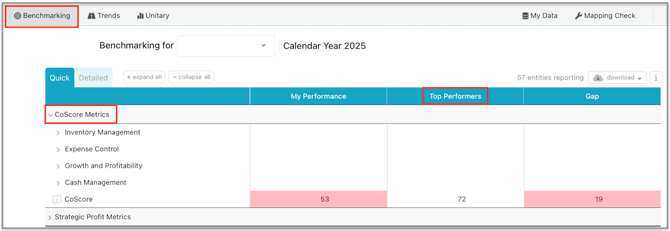
CoScore is used to identify the highest-performing companies within your group. It defines the "Top Performers" segment featured in benchmarking reports. The Top Performers group is comprised of the top 25% of CoScoring companies for the selected comparison periods.
How do I read the graph?
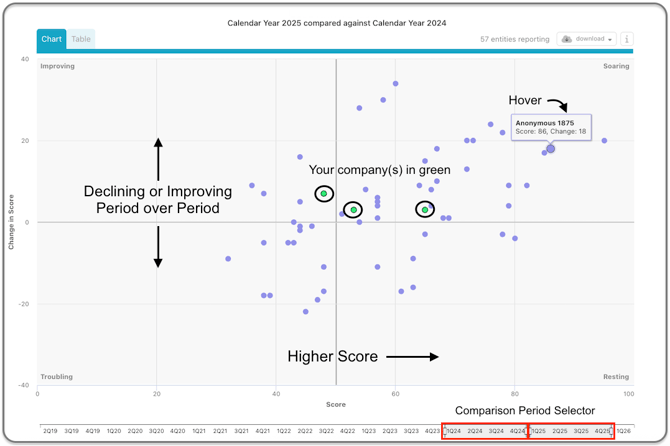
Purple dots represent other companies in your group, that have participated for both periods selected for comparison. Their company information is anonymized for security. Any companies you have permissions for will appear as green dots.
The comparison periods can include as many as four quarters, or as few as one quarter.
- Right: Higher CoScore
- Up: Larger positive change from period to period
- Left: Lower CoScore
- Down: Larger negative change from period to period
Example: The companies shown below had a slight positive change period over period, and are resting towards the middle of the group in CoScore.
Diving In
The CoScore give you a broad stroke view on your company's health, and allows you to see how you're comparing to the other participants in your group.
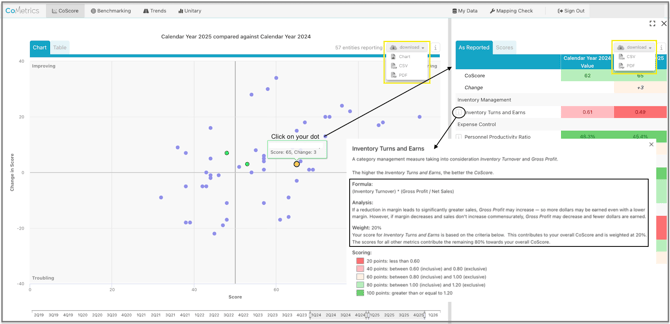
Click on your company (purple dot) on the graph to show the side bar with all of the CoScore metrics. Here you can click on the "i" information icon for each metric to see how it is calculated, why the metric is important, and the weight that metric has in the overall CoScore.
Each chart/graph is downloadable in different formats, so you can use the information for internal or external conversations and reporting. You can expand or break out windows as necessary.
The data, color coding and scoring within the CoScore windows gives you an idea of metrics you may want to review further in the Benchmarking tab.